



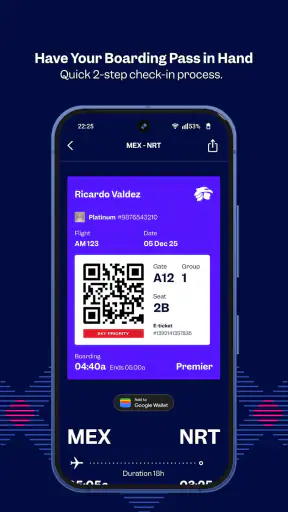
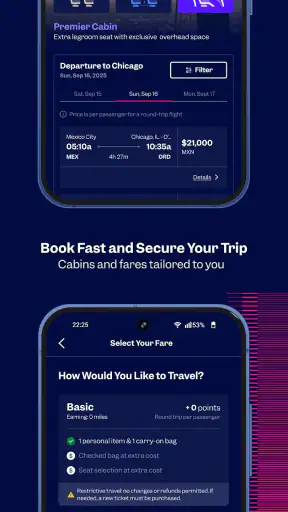


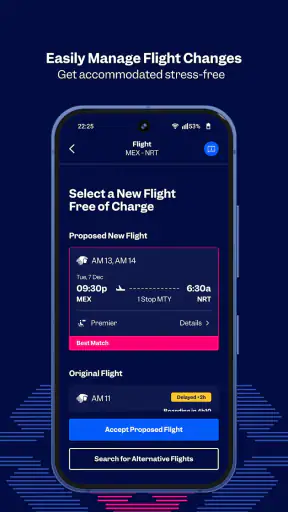

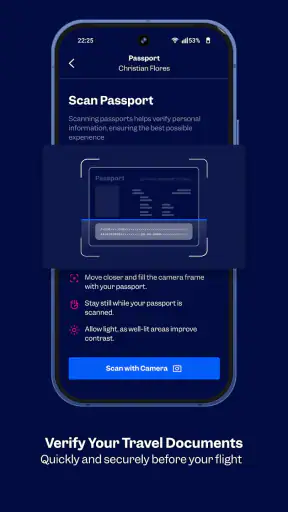
I first looked at Aeroméxico as a household travel tool rather than just another airline app. That distinction matters. On a shared phone, one person may be arranging a work trip, another may be checking a family journey, and someone else may only need a quick look at flight information. An app can be useful in all three situations, but only if everyone understands where personal travel details begin and where shared planning ends.
My overall impression is positive. Aeroméxico is a free Travel & Local app from Aerovías de México S.A. de C.V., and it feels most valuable when it sits close to the actual trip: checking an itinerary, preparing for departure, or keeping travel information available without moving between several unrelated services. Its store summary, “Be closer, reach further,” is brief, but the practical appeal is easy to understand: it puts the airline’s own travel channel on the phone instead of making me rely entirely on a browser or a collection of screenshots.
The app has an average rating of 4.8 from around 105 thousand ratings, with more than one million installs. Those figures suggest that it has found a broad audience, although they do not remove the need to judge whether it fits your own travel habits. I would recommend it most strongly to people who regularly fly with Aeroméxico or who are coordinating a trip where having the airline’s own app nearby is more convenient than searching through email and web pages.
Using it on a shared household phone
The most realistic shared-device example is a family preparing for a holiday. One adult may have made the reservation, another may be responsible for checking the departure details, and a teenager may simply need to know when everyone is leaving. In that situation, I would not treat the app as a communal notebook. I would use it as the traveler’s working tool and share only the information that the rest of the household actually needs.
That approach avoids a common source of confusion: mixing several travelers’ details into one person’s routine. If the booking belongs to one adult, that person should remain the main organizer. A partner or relative can help with planning, but I would avoid casually passing around access to personal travel information. The app is more useful when each person knows which details they are responsible for rather than when everybody edits or checks everything.
For a household, the strongest benefit is continuity. Instead of one person keeping the booking in an inbox while another relies on a message thread, the family can agree that the traveler or trip organizer will use Aeroméxico as the primary reference. Screenshots can still be useful for quick sharing, but I would check the app again before leaving because screenshots can become outdated after a change.
I also found that the app makes more sense when used at specific moments rather than opened repeatedly without a purpose. Before the journey, I would use it to organize the trip and confirm what needs attention. On the travel day, I would keep it available for quick reference. After arrival, I would stop treating it as the household’s general travel archive and return to the person who owns the booking for any follow-up.
The useful household rule is simple: one person coordinates, everyone else receives only the information they need. That is not a special family feature; it is a sensible way to use an airline app without turning a shared phone into a shared account.
What I would do before handing over the phone
If a relative needs to check something, I would show the relevant screen rather than leave the whole device unlocked with the app open. This is especially sensible when the phone is shared with children or guests. Travel information can contain details that are appropriate for the traveler but unnecessary for everyone else to browse.
I would also avoid relying on one device as the only source of important information. A household can agree on the departure plan separately, while the traveler keeps the app for the detailed reference. That small separation makes the arrangement less fragile if the phone battery is low, the device is unavailable, or someone accidentally closes the app.
Setup, account boundaries, and everyday coordination
My advice is to start with a clear question: who is the app for on this phone? If it is your own device, the answer is straightforward. If it belongs to a couple, a parent, or a household, decide whether it is being used by one traveler or as a temporary planning screen. That decision helps prevent the biggest practical mistake: assuming that a shared device should automatically mean a shared travel identity.
I would keep the app associated with the person who actually needs to manage the journey. If another household member needs information, I would coordinate verbally or through the family’s normal communication method instead of changing the main user’s setup every time. This is less convenient than a fully shared dashboard, but it is clearer and reduces the chance of one person confusing another person’s trip with their own.
There is also a difference between installing the app for occasional reference and making it part of your regular travel routine. Occasional travelers may prefer the mobile website because they do not want another app on the phone. That is a reasonable choice, particularly if they have one simple trip and no intention of using the airline’s mobile tools again soon. The app earns its place when the convenience of having Aeroméxico nearby outweighs that extra installation.
For frequent Aeroméxico passengers, the calculation changes. Having the airline’s own app ready can be more direct than starting with a search engine, opening an email, or navigating a general travel platform. I would still compare the app with the tools I already use, because a general travel organizer may be better for combining several airlines, hotels, trains, and ground transport in one itinerary.
This is one of the app’s important boundaries. It is airline-specific, so its usefulness is naturally strongest around Aeroméxico travel. If your household regularly books different carriers, a broader travel app may be a better central organizer, while Aeroméxico remains a useful companion for the part of the journey it covers.
The current version is 1.4.35, and the app supports Android 9 or later. That makes checking device compatibility worthwhile before planning around it, especially on an older shared phone. The app is free, so the decision is less about purchase cost and more about storage, device access, and whether you will actually use an airline-specific tool.
Keeping coordination practical
For a family departure, I would create a small routine. The main traveler checks the app, then tells the rest of the household the agreed meeting time and travel plan. If something changes, the same person checks again and communicates the update. This avoids a situation where one family member reads an old message while another has seen newer information.
For a couple traveling together, both people may want access to the same journey details, but I would still choose one person to be the reference point. That does not mean the other traveler is excluded; it simply gives the household a clear answer when memories, messages, or saved images conflict. The app works best when it supports coordination rather than becoming another place where conflicting notes accumulate.
For a parent traveling with a child, I would use the app as the adult’s tool and explain the relevant plan in age-appropriate language. A child may need to know where and when to meet, but does not necessarily need unrestricted access to the entire travel setup. Aeroméxico is rated for Everyone, which makes it suitable as a broadly accessible app, but an Everyone age rating is not the same thing as a substitute for adult supervision or family judgment.
What changes when several trips are involved
Households with multiple upcoming journeys should be especially careful about mental labels. I would name each trip in my own notes by destination or traveler, then open the app with that context already in mind. This is a simple habit, but it helps prevent the classic mistake of checking the wrong booking while rushing through travel preparation.
I would also avoid assuming that the app should replace every other record. Keep the household’s basic plan somewhere everyone can understand, while leaving the detailed airline information with the relevant traveler. That division is more dependable than asking one app to serve as booking manager, family calendar, emergency contact list, and shared archive all at once.
Age, trust, and who should use it
Aeroméxico is listed for Everyone, and I see that as an accessibility signal rather than a reason to hand the phone to any child without guidance. The app belongs to a travel context, so adults should decide how much information a younger household member needs. A child can participate in planning and learn the departure routine without being responsible for the entire booking or the security of the family’s travel details.
Trust also matters between adults. If one person booked the trip, that person should be comfortable with who can view the information. Shared-device use is convenient, but convenience can blur boundaries. I would not leave a signed-in airline app open on a phone that regularly changes hands, particularly if the device is used by visitors, children, or coworkers as well as family.
That does not make the app unsuitable for households. It simply means the app should be treated like a personal travel workspace, not like a public family noticeboard. A shared calendar can hold the broad plan, while the traveler keeps the airline-specific details in the app. In my view, this is the most balanced arrangement for trust and convenience.
Older relatives may appreciate having the airline’s app available, but setup should be done calmly rather than at the airport. I would help them identify the app, confirm that the device runs Android 9 or later, and practice the basic journey they are likely to repeat: open the app, find the relevant trip, and return to the information they need. The goal is confidence, not giving them a complicated system to learn under pressure.
For someone who rarely flies, the app may feel like unnecessary preparation. If the person is comfortable using a browser and has a straightforward itinerary, the usual website may be enough. I would choose Aeroméxico for them when the trip benefits from having the airline’s own mobile presence ready, not simply because every traveler is expected to install an app.
Where it beats general travel alternatives
Compared with a general travel organizer, Aeroméxico has a narrower but more relevant role for Aeroméxico passengers. A general organizer is usually better at putting different companies and transport types into one broad itinerary. Aeroméxico, by contrast, is the more natural first stop when the question is specifically about an Aeroméxico journey.
Compared with relying only on email, the app offers a more deliberate travel workflow. Email is excellent for keeping confirmations and receipts, but it can bury important information among unrelated messages. The app is easier to justify when I want the airline’s travel context in one place rather than searching through an inbox.
Compared with screenshots, the app is the safer habit for checking current information. A screenshot is quick to send to a relative, but it is a frozen copy. I would use it for communication, never as my only reference when plans are changing or when I am about to leave home.
Compared with a mobile browser, the choice is personal. The browser avoids installation and may suit a one-time traveler. The app is more appealing to me when I expect to travel with Aeroméxico again or want a dedicated place for the airline’s mobile experience. Neither option is automatically best for every passenger.
Small habits that make the app more useful
My first tip is to check the app before the household starts discussing the trip, not after everyone has formed separate assumptions. That gives the coordinator a current reference point and makes the conversation shorter. My second tip is to distinguish “the booking exists” from “the trip is ready.” Those are different stages, and a household should not assume that saving a confirmation means every traveler knows what to do next.
My third tip is to use the app as a prompt for preparation rather than as a replacement for preparation. I would make sure each traveler knows the broad schedule, who is carrying the important documents, and who will handle questions. The app can support that plan, but it cannot coordinate a family that has never agreed on responsibilities.
My fourth tip is to avoid installing it on a device that nobody will have during the journey. A shared tablet at home may be useful during planning, but the traveler’s phone is the more practical place for last-minute reference. If the household uses several devices, choose the one that will actually travel with the person responsible for the booking.
Finally, I would update my expectations when moving between app versions. The release date was May 8, 2024, and the current version is 1.4.35, so the app is clearly maintained as a current product rather than an abandoned download. Even so, I would not assume that every screen will look exactly the same forever. A quick review before a trip is wiser than memorizing a workflow months in advance.
My household verdict
I would recommend Aeroméxico to a household when at least one traveler uses Aeroméxico often enough to benefit from a dedicated airline app. It is free, available to a broad age audience, and supported by a large user base. More importantly, it can give the trip organizer a focused place to work instead of forcing every detail through email, browser tabs, and shared messages.
I would not make it the only travel tool for a family that mixes several airlines or expects one app to manage every part of a holiday. A general travel organizer may be better for the complete itinerary, while a browser may be simpler for a one-off journey. The right choice depends on whether your household needs an Aeroméxico-focused companion or a universal travel hub.
My strongest recommendation is to establish boundaries before installation becomes part of the travel rush. Decide who owns the booking, who checks the app, what information the rest of the household needs, and which device will travel. Those four decisions remove much of the friction that people often blame on the app itself.
In my experience, Aeroméxico is at its best when it stays focused: one airline, one trip context, and one clear coordinator. It is not a substitute for family communication, and it should not be treated as a public account on a shared phone. Used with that understanding, it becomes a practical part of preparing for travel rather than another source of confusion.
For Aeroméxico passengers who value a dedicated mobile option, I think it is worth installing. For occasional travelers who prefer a browser or households that need a cross-airline planner, I would compare those alternatives first. The app’s real strength is not that it tries to do everything; it is that it gives Aeroméxico travelers a focused tool they can fit into a sensible household routine.


